Showing posts with label Office 365. Show all posts

Free SharePoint Book from Microsoft for ITPro

Thursday, December 4, 2014


Download free book to explorer all Feature in Side SharePoint and Labs guide. this books is majorly focusing on ITPros but i recommend SharePoint/0365 dev also to look at it. it a nice overview for SharePoint Workload.
http://www.microsoft.com/en-us/download/confirmation.aspx?id=35396

Office365/SharePoint Community Meetup

Tuesday, November 25, 2014


Registration
https://www.eventbrite.com/e/office365sharepoint-community-meetup-tickets-14600834489

Free Office 365 Exams! Free Azure Exam :)

Sunday, November 16, 2014

Free Office 365 Exams!
Once of my friend informed and I checked confirmed that  if  you know how to deploy Office 365. You know you know how to deploy Office 365. Let's prove it to the rest of the world!
Now through the end of the year Microsoft is providing you an opportunity to obtain your MCSA: Office 365 on us! It is easy to register, just follow these easy steps:
Visit http://borntolearn.mslearn.net/goodstuff/p/mcp.aspx to request an exam voucher
Schedule and take your exam by December, 31, 2014.
Pass the exam and earn your new certification!
Keep in mind there is a finite amount of free exams available. You can check out what the exams cover as well as training options here: https://www.microsoft.com/learning/en-us/mcsa-office365-cert… But let's face it, you know and I know, that you know how to deploy Office 365. Go prove it to the rest of the world!


Get a FREE Microsoft practice test.
 http://pearsonvue.postclickmarketing.com/mcp-exams-microsoft-3

For Exam Preparations
http://www.microsoftvirtualacademy.com/training-courses/office-365-fundamentals

http://www.microsoftvirtualacademy.com/training-courses/managing-office-365-identities-and-services

http://www.microsoftvirtualacademy.com/training-courses/office-365-deployment-for-it-pros

SharePoint and Office 365 End User Training Abu Dhabi

Monday, March 10, 2014


More details about Course

About this Course

This SharePoint 2013 End User class is for end users working in a SharePoint 2013 environment. The course teaches SharePoint basics such as working with lists and libraries as well as basic page customizations.
Audience Profile
This course is intended for new and existing users of SharePoint.
At Course Completion
After completing this course, students will be able to:
Learn to navigate a SharePoint 2013 Team Site.
Learn to create SharePoint lists.
Learn to customize SharePoint lists.
Learn to create SharePoint libraries.
Learn to manage library document versions.
Learn to create SharePoint list and library views.
Learn to create sub sites using various SharePoint templates.
Learn to create and edit Web page content.
Learn to create InfoPath Forms and Form libraries.
Learn to create Site columns and content types.
Learn to integrate Office applications with SharePoint 2013.
Learn to manage basic permissions of SharePoint 2013 resources.

Microsoft unleashes Office 365 Android SDK for developers

Friday, March 7, 2014

Recently Microsoft unleashes the Office 365 SDK for Android Developer that all them to use Office API with in Android Platforms. Microsoft  its Open doors for Android Developer to create great App with Microsoft Services such as Office 356. Microsoft  Ex,CEO mention that so many time in past  that Microsoft is  transformation as software to device and services Company.  More details and Load link


the AAD Android library Preview in order to generate access tokens to Windows Azure Active Directory.


Ref
http://www.winbeta.org/news/microsoft-unleashes-office-365-android-sdk-developers-play


By Usama Wahab Khan

Create App By using Napa Office 365 Development Tool. Complete Step by Step

Tuesday, October 2, 2012


basic operations using the JavaScript client object model in SharePoint 2013 Preview. Create,Delete Items.

Napa
The “Napa” Office 365 Development Tools make it easy to start building apps for Office and SharePoint without leaving your browser or installing software. Just add the “Napa” Office 365 Development Tools app to your SharePoint Online Developer Site, launch it, and you will be ready to create your first app for Office or SharePoint.

When you are ready to leverage the powerful capabilities in Microsoft Visual Studio 2012, the “Napa” Office 365 Development Tools makes it easy to download your project, get the required software and continue developing your app for Office or SharePoint.


Sign up for an Office 365 Developer Site 
Sign up for a trial during the preview period.

Step by Step how to Sign Up @ Office 365 Developer Site

 Once Create Account on  Office 365 Developer Site  you will see Office 365 Admin Center page.

Installing and Configring Napa App with Dev Site

1. Goto SharePoint>Administration Center>Apps>Purchaes App


2. Search and Select Napa Office 365 App form SharePoint App store and  Click on ADD IT button

3. Click on Return to Site button. Might be it will take few mints.

Create Developer Site to enable NAPA APP FOR DEVELOPMENT FEATURE 


4.Go back to SharePoint Administration Center then Click on Site Collection on left Menu .then Add new Site in as Private site.
SharePoint Administration >Site Collections>New>Private Site Collection


4. Select Developer Site Template form new site collection list. than fill basic info and Press OK button.
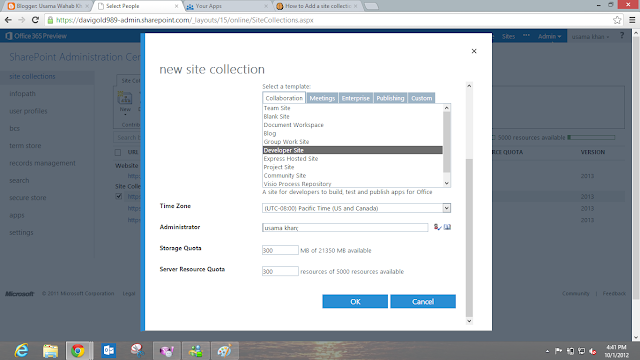


6.Once you Complete Creation of Site Collection you will see Develoepr site with new url in your site collection list then go to your developer site
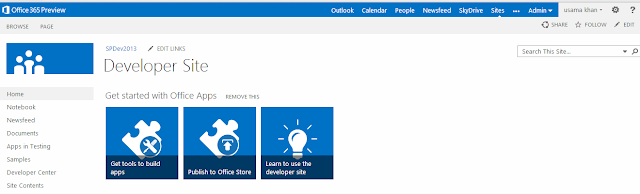


7.then Click on top setting Icon>Add App and Select Napa App
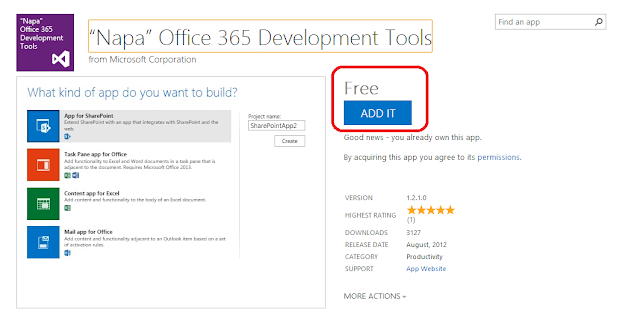


8.Click on Trust it button

9. Napa Start up Screen will appear with three options Select App for SharePoint and mention your App name 


Once you Click on Create button you will See Napa Console on browser.


Guide for Napa 
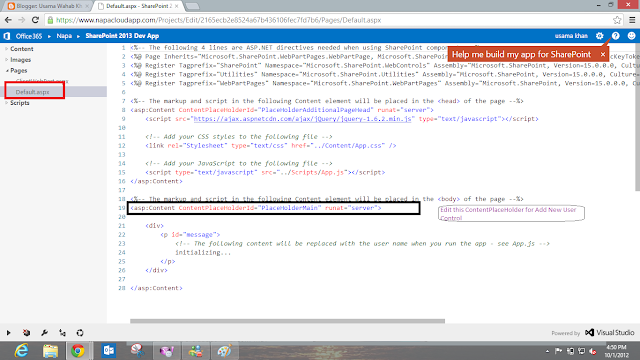


10.then on your left hand site panel you will see treeview. select Pages>Default.aspx and Modify the Content PlaceHolder called PlaceHolderMain with Following Code example (code file are give blow).


11.Add this Code under PlaceHolderMain ContentPlaceHolder
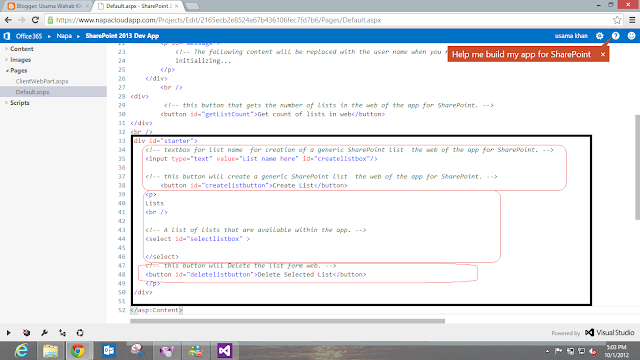


12.in Left Menu Click on Script section and select App.js  and Add Code under the SharePointReady Function

13.add this code for bind click events of  three button that we add in default.aspx page.


14.Add these Functions end of the App.js File


15.then on > Play Icon from bottom bar. and deploy and launch the App

16.if App will not open automatically kindly check your browser might block the popup window.


17 Test App Add list Delete list ,Get list Count in web Operation


Add Code and Controls for Adding  and Deleting List Items.

18.Go back to Default.aspx and Find Selectionlistbox and add Onchange event with getitem method 


19 Add this Code under Selectionlistbox for Creating Items and Deleting them
20  Go to Script >App.js Again and add the following Code under the SharePointReady Fuction


End of the App.js file Add this Following code Step by Step


then Publish you app Again with Play icon on bottom it will upload and update your app again

Launch App Again
Test All Operation that you Create by Code


Open Compete Project in Your Visual Studio by Click on Visual Studio Icon on Bottom bar


Download Source Code


By Usama Wahab Khan