Showing posts with label Share Point. Show all posts

Service Pack for SharePoint Server 2013 1 Recalled [Updated]

Tuesday, April 22, 2014

The updated version of Service Pack 1 has been released today!
Refer to the information below to acquire the updated Service Pack for your product:
NOTE The KB articles for the re-released Service Pack is different from the recalled Service Pack.
  • KB 2880551 - SharePoint Foundation 2013 SP1
  • KB 2880552 - SharePoint Server 2013 SP1
  • KB 2880553 - Project Server 2013 SP1
  • KB 2880554 - SharePoint Server Language Pack
  • KB 2880555 - SharePoint Foundation Language Pack
  • KB 2880558 - Office Web Apps Server 2013 SP1
Download links for updated SP1:
  
Customers with Service Pack 1 Deployed
For customers who have previously deployed Service Pack 1, download the updated Service Pack 1 and install over the existing Service Pack 1 running PSConfig or PSConfigUI immediately following.
Customers without Service Pack 1
For customers without Service Pack 1 deployed, download the updated Service Pack 1 package and deploy as per the KB documentation.

Reference
see official announcement in Bill Baers blog post.

Speaking at SharePoint Saturday 2014 GUFL

Tuesday, April 1, 2014


My Session At Introduction to SharePoint Cloud Business Apps

By using the Cloud Business App template in Visual Studio, you can create apps for SharePoint in which users can view, add, and update SharePoint data. The Cloud Business App project type uses Visual Studio LightSwitch technologies, which greatly simplify the process of creating business app hosted on SharePoint. In this walkthrough, you’ll create an app to track job candidates, taking advantage of the SharePoint for Office 365 social integration feature to provide a newsfeed for the app.


About SPS Gulf
SharePoint administrators, end users, architects, developers, and other professionals that work with Microsoft SharePoint Technologies are invited to attend the 1st Live Online SharePoint Saturday Gulf event on April 12​th at 10:00 AM (GMT +4).

SharePoint Saturday Gulf is a free, educational, informative, & lively day filled with sessions from respected SharePoint professionals, MCMs, MCTs & MVPs who are willing to share their great experience.

In order to hear the presenters, you will need headphones or computer speakers. There will be no conference call dial-in phone numbers; everything will be done over your computer.

We are all about bringing great SharePoint content to the Arab Gulf area​. Follow us on Twitter at #SPSGulf.​

For Registrations
http://www.spsevents.org/city/Virtual/Gulf2014/speakers#


Speaking At MEA MVP OPEN DAY ISTANBUL

Wednesday, March 19, 2014


Representing 18 countries within Middle East & Africa, MEA MVP Program is the home for 125 MVPs across a wide-range of expertise contributing to the Microsoft communities day and night. Additionally to the Global MVP Summit where you can interact with specific product groups focusing your expertise we are proud to announce a local MVP gathering in our region and call it the “MEA MVP Open Day”. You will not only have the chance to meet your peers from the region but use this as an opportunity to enjoy a great keynote by MEA HQ DPE Lead Aben Kavoor, Microsoft MVP Program Business Lead Michael Fosmire, Nokia Developer Champion CEE Lead Darius Dariusz Zalewski, and International Senior Site Manager (MSDN & TechNet) Ekaterina Lajintseva. You might guess that we have more to share and you are definitely right. We just love surprises and will keep these at they are.

http://2014meaopenday.com/

I Received MVP Welcome Kit

Tuesday, January 7, 2014


I Just Received MVP Welcome Kit thanks Microsoft :)

Received 2014 Microsoft® MVP Award!

Thursday, January 2, 2014

Due to grace of Almighty Great ALLAH, I Received Microsoft 2014 Most Valuable Professional Award for SharePoint Server.  thanks to my friends ,family, my dadi,and community Dev Saturday UAE UAE SharePoint SharePoint Saturday Abu Dhabi AUC Technologies User Group (AUCTUG)Special Thanks to Microsoft Gulf  for your support. Last Night Received email from Microsoft .


Dear Usama Khan,

Congratulations! We are pleased to present you with the 2014 Microsoft® MVP Award! This award is given to exceptional technical community leaders who actively share their high quality, real world expertise with others. We appreciate your outstanding contributions in SharePoint Server technical communities during the past year.

Also in this email:

  • About your MVP Award Gift
  • How to claim your award benefits
  • Your MVP Identification Number
  • MVP Award Program Code of Conduct
The Microsoft MVP Award provides us the unique opportunity to celebrate and honor your significant contributions and say "Thank you for your technical leadership."

Mike Hickman
Director
Community Engagement
Microsoft

SharePoint Add Users To SharePoint Group

Saturday, December 7, 2013


//Add User in SharePoint Groups
public void addUserToGroup(string groupName, string useName)
{
    string strUrl = "http://MySites:9091/";
    using (SPSite site = new SPSite(strUrl))
    {
        using (SPWeb web = site.OpenWeb())
        {
            try
            {
                web.AllowUnsafeUpdates = true;
                SPUser spUser = web.EnsureUser[userName];

                if (spUser != null)
                {
                    SPGroup spGroup = web.Groups[groupName];
                    if (spGroup != null)
                    spGroup.AddUser(spUser);
                }
            }
            catch (Exception ex)
            {
                throw ex;
            }
            finally
            {
                web.AllowUnsafeUpdates = false;
            }
        }
    }
}

ensure that user have permission to execute this method.

Helpful Link and Ref:
http://msdn.microsoft.com/en-us/library/microsoft.sharepoint.spweb.ensureuser.aspx
http://msdn.microsoft.com/en-us/library/office/ms414400.aspx
http://gallery.technet.microsoft.com/office/Bulk-remove-Unique-bddd8764

Developing Apps for SharePoint 2013 - Dubai

Wednesday, October 23, 2013


Join us

Venue and Registration will publish on Facebook  UAESharePoint UG Page 

Event Updates Click Here

I am speaking in Abu Dhabi SharePoint Saturday

Monday, September 30, 2013

I am speaking at the  Abu Dhabi SharePoint Saturday on 5 Oct 2013.  my session hardcorely for developers. i will going to talk about new Improvements that SharePoint 2013 has made from Previous version and Types of API  showcased the developers to Get Started and share Learning resources. More talk about difference between CSOM and Rest and Selection of Right API for you App.

Session Title:  What's new for Developer (REST and CSOM API) 


Registration:
http://www.eventbrite.com/event/5188302352/efbnen


Abu Dhabi's Premier SharePoint Technology and Enterprise Content Management Community Event, Featuring local and internationally acclaimed speakers, this event is not to be missed.

Come and join SharePoint MVP's, Architects, Administrators, Developers, Business Users and other Professionals who work with SharePoint.

SharePoint Saturday is FREE and is open to the public for registration.

 
Join us on facebook at SharePoint Saturday Abu Dhabi 2013 and follow us at @spsabudhabi
 

Event location and other details will be posted soon.

MVA Certifcate of Learining

Monday, May 27, 2013


Build a FREE SharePoint 2013 Lab in the Cloud with Windows Azure

Sunday, January 27, 2013


What about a SharePoint 2013 Lab in the Cloud?
Now that SharePoint Server 2013 has been released, I frequently get asked about ways in which a SharePoint 2013 lab environment can be easily built for studying, testing and/or performing a proof-of-concept.  You could certainly build this lab environment on your own hardware, but due to the level of SharePoint 2013 hardware requirements, a lot of us may not have sufficient spare hardware to implement an on-premise lab environment.

This makes a great scenario for leveraging our Windows Azure FREE 90-day Trial Offer to build a free lab environment for SharePoint 2013 in the cloud.  Using the process outlined in this article, you’ll be able to build a basic functional farm environment for SharePoint 2013 that will be accessible for approximately 105 hours of compute usage each month at no cost to you under the 90-day Trial Offer.

After the 90-day trial period is up, you can choose if you’d like to convert to a full paid subscription.  If you choose to convert to a paid subscription, this lab environment will cost approximately $0.56 USD per hour of compute usage ( that’s right – just 56 cents per hour ) plus associated storage and networking costs ( which can typically be less than $10 USD per month for a lab of this nature ). These estimated costs are based on published Pay-As-You-Go pricing for Windows Azure that is current as of this article’s date.

Note: If you are testing advanced SharePoint 2013 scenarios and need more resources than available in the lab configuration below, you can certainly scale-up or scale-out elastically by provisioning larger VMs or additional SharePoint web and application server VMs.  To determine the specific costs associated with higher resource levels, please visit the Windows Azure Pricing Calculator for Virtual Machines.

SharePoint 2013 Lab Scenario
To deliver a functional and expandable lab environment, I’ll be walking through the approach of provisioning SharePoint Server 2013 on Windows Azure VMs as depicted in the following configuration diagram that will require three (3) VMs on a common Windows Azure Virtual Network.


I Find this Great Post on keithmayer Blog. for Complete Article and Lab follow the link blow
Reference .
http://blogs.technet.com/b/  archive/2013/01/07/step-by-step-build-a-free-sharepoint-2013-lab-in-the-cloud-with-windows-azure-31-days-of-servers-in-the-cloud-part-7-of-31.aspx#.UQaO6r_O0gM

Cool tool for FBA Management in SharePoint 2010

Wednesday, November 7, 2012

A forms based authentication pack for SharePoint 2010. It includes web parts for registering users, changing passwords and password recovery. It includes tools for managing users and roles and for approving registrations. This is a port of the CKS Forms Based Authentication Solution for SharePoint 2007


Features

User Management page allows you to Create, Edit, Delete and Search for users. Allows for password reset and user unlocking. Users can be assigned to SharePoint Groups or Roles.
Role Management page allows roles to be created and deleted.
Built in Change Password page and menu item.
Optionally review and moderate new membership requests.
Web parts can be completely customized using HTML templates. Simple customizations can be done with the web part properties.
User emails can be completely customized using XSLT templates.
Password Recovery web part allows look-ups by both username and email address.
Membership Request web part includes optional CAPTCHA, optional auto generate password, optional login registered user.

Completely localizable. Currently languages include English and Chinese.

Enhancements in SharePoint 2013 Workflows.

Saturday, October 6, 2012


I was Deep Diving in SharePoint 2013 Workflow. Find So many new things in SP2013 like new architect. this time workflow is not running in side the SharePoint. its working with azure workflow. new important Enhancements which area really great.

  1.   finally Loop is fully integrated actions. 
  2.   new Feature called "Workflow Stages"  for SPD Preview 2013 no need to create state Machine workflow .
  3.  new Actions like "Start a Task Process","Assign a task" .
  4.  "Call Web Service" Action use data from web-service in workflow.
  5.  new Variables types like "Dictionary Type Variables" for an array.  
  6.  absence of Design View in SharePoint 2013.  
  7. Visual Studio 2012 workflow project type support;
  8. Support for creating custom actions.
  9. Based On Windows Workflow 4.0.


    New Actions in SP2013 Workflow


    Action Description
    Assign a Task Assigns a single workflow task to a user or group.
    Start a Task Process Initiates execution of a task process.
    Go to This Stage Specifies the next stage in a workflow to which flow control should be handed.
    Call HTTP Web Service Functions as a method call to a Representational State Transfer (REST) endpoint.
    Start a List Workflow Starts a list-scoped workflow.
    Start a Site Workflow Starts a site-scoped workflow.
    Build DynamicValue Creates a new variable of type DynamicValue.
    Get Property from DynamicValue Retrieves a property value from a specified variable of type DynamicValue.
    Count Items in DynamicValue Returns the number of rows in a variable of type DynamicValue.
    Trim String Removes all leading and trailing white-space characters from the current string.
    Find Substring in String Returns 1-based index of the first occurrence of one or more characters, or the first occurrence of a string, within a string.
    Replace Substring in String Returns a new string in which all occurrences of a specified character or string are replaced with another specified character or string.
    Translate Document Functions as a wrapper around the HTTP activity that calls the synchronous translation API. You must configure a Machine Translation Service Application for the SharePoint site on which you run the workflow.
    Set Workflow Status Updates workflow status as specified in message string.
    Create a Project from Current Item [Microsoft Project] Creates a Project Server project based on the current item.
    Set the current project stage status to this value [Microsoft Project] Sets the two status fields within the current stage of the project.
    Set the status field in the idea list item to this value [Microsoft Project] Updates the status field of the original SharePoint list item.
    Wait for Project Event [Microsoft Project] Pauses the current instance of the workflow to await a specified Project event: Project checked in, Project committed, Project submitted.
    Set this field in the project to this value [Microsoft Project] Sets the value for th

but i am really enjoy allot. with these new tools. on every step its feel like when you get new toy in my childhood.

Microsoft Announces new Certifications for SharePoint 2013

Wednesday, October 3, 2012


Exam 331 Core Solutions of Microsoft SharePoint Server 2013

Skills
Design a SharePoint Topology  (Read )

·         Design information architecture. 
·         Design a logical architecture.
·         Design a physical architecture.
·         Plan a SharePoint Online (Microsoft Office 365) deployment.
o     
Plan Security(Read) (Read)(Source Store) (Read)
·         Plan and configure authentication.
·         Plan and configure authorization.
·         Plan and configure platform security.
·         Plan and configure farm-level security.
·          
·         Plan installation.
·         Plan and configure farm-wide settings.
·         Create and configure enterprise search.
·         Create and configure a Managed Metadata Service (MMS) application.
·         Create and configure a User Profile Service (UPA) application.

·         Provision and configure web applications.
·         Create and maintain site collections.
·         Manage site and site collection security.
·         Manage search.
·         Manage taxonomy.

·         Monitor a SharePoint environment.


Exam 70-332: Advanced Solutions of Microsoft SharePoint Server 2013


Skills


Plan Business Continuity Management (21 percent)
·         Plan for SQL high availability and disaster recovery.
·         Plan SharePoint high availability.
·         Plan backup and restore.
·         Plan a social workload.
·         Plan and configure a search workload.
·         Plan and configure a Web Content Management (WCM) workload.
·         Plan an Enterprise Content Management (ECM) workload.

·         Evaluate content and customizations.
·         Plan an upgrade process.
·         Upgrade site collection.

·         Create and configure App Management.
·         Create and configure productivity services.
·         Configure service application federation.
·         Create and configure a Business Connectivity Service (BCS) and Secure Store application.
·         Manage SharePoint solutions and applications.
·         Plan and configure a BI infrastructure.
·         Create and configure work management.


Clinic 40027A:

First Look Clinic: What's New for Developers in Microsoft SharePoint 2013


 Clinic 40028A:

 First Look Clinic: What’s New for IT Professionals in Microsoft SharePoint Server 2013


http://www.microsoft.com/learning/en/us/Course.aspx?ID=40028A&Locale=en-us

More Info
http://www.microsoft.com/learning/en/us/certification/cert-sharepoint-server.aspx#

Fixed ribbon and scroll bar issues.

Monday, October 1, 2012

The new Ribbon functionality in SharePoint 2010 can cause some frustration when creating custom master pages. The trick is to develop a master page with the ribbon always on top of your page without losing functionality and keep the content scrolling working correctly. Sometimes the scroll bars seems to grow outside the browser window leaving the end-user unable to scroll to the bottom of the page. Chances are that you forgot some HTML in the master page.

Source : Read Full Article 


Most Important Design Patterns for SharePoint developer

Friday, September 21, 2012


A design pattern approach in SharePoint development is very important for standard and  reusable Solution for most common problems in software development. A design pattern is not only for implementation of code. its solution template to solve real life Programmatic Problems.  adopting design pattern approach to develop solution for SharePoint    that allows you to formulate a high level Solutions that is independent of the implementation details.


Most Common Design Pattern for SharePoint Development.


  • Model-View-Presenter (MVP)
  • Repository
  • Service Locator
  • The Trusted Façade Pattern

Model-View-Presenter (MVP)


As UI-creation technologies such as ASP.NET and Windows® Forms become more and more powerful, it's common practice to let the UI layer do more than it should. Without a clear separation of responsibilities, the UI layer can often become a catch-all for logic that really belongs in other layers of the application. One design pattern, the Model View Presenter (MVP) pattern, is especially well suited to solving this problem.


In SharePoint
A Web page or Web Part in a SharePoint application contains controls that display application data. A user can modify the data and submit the changes. The Web page or Web Part retrieves the data, handles user events, alters other controls on the page in response to the events, and submits the changed data. Including the code that performs these functions in the Web page or Web Part makes them complex, difficult to maintain, and hard to test.


Repository

Repositories act as mediators, or interface layers, between different parts of an application. The Training Management application uses repositories to manage persistence of information. The Training Management repositories are responsible for querying SharePoint and for updating SharePoint list items.

Retrieving data from SharePoint lists requires careful use of the SharePoint API, knowledge of the GUIDs related to lists and fields, and a working knowledge of Collaborative Application Markup Language (CAML). The Training Management Web forms, event receivers, and workflow business logic all require access to the Training Management lists. In the original version of the application, the list access logic was scattered throughout the application. To correct this problem, the application now centralizes the list access logic in repositories. Repositories simplify the access to list data and provide a layer of abstraction that makes unit testing with mock objects much easier.

Mostly SharePoint applications,  the business logic accesses data from data stores such as SharePoint lists, or Web services. Directly accessing the data can result in the following:

  • Duplicated code
  • A higher potential for programming errors
  • Weak typing of the business data
  • Difficulty in centralizing data-related policies such as caching
  • An inability to easily test the business logic in isolation from external dependencies
Use the Repository pattern to achieve one or more of the following objectives:

  • You want to maximize the amount of code that can be tested with automation and to isolate the data layer to support unit testing.
  • You access the data source from many locations and want to apply centrally managed, consistent access rules and logic.
  • You want to implement and centralize a caching strategy for the data source.
  • You want to improve the code's maintainability and readability by separating business logic from data or service access logic.
  • You want to use business entities that are strongly typed so that you can identify problems at compile time instead of at run time.
  • You want to associate a behavior with the related data. For example, you want to calculate fields or enforce complex relationships or business rules between the data elements within an entity.
  • You want to apply a domain model to simplify complex business logic.

Interactions of the repository

  Interactions of a SharePoint list repository

 
Using the Repository pattern in a SharePoint application addresses several concerns.

SharePoint applications often store business information in SharePoint lists. To retrieve data from SharePoint lists requires careful use of the SharePoint API, knowledge of the GUIDs that are related to the lists and their fields, and a working knowledge of CAML. Repositories centralize this logic.
The amount of code that is required to query or update a SharePoint list item is enough to warrant its encapsulation into helper methods. When Web Forms, event receivers, and workflow business logic all require access to the same lists, the code that accesses the SharePoint lists can be duplicated throughout the application. This can make the application prone to bugs and difficult to maintain. Repositories eliminate this duplication.
Without a repository, the application is difficult to unit test because the business logic has direct dependencies on the SharePoint lists. Repositories centralize the access logic and provide a substitution point for the unit tests.
Components of a SharePoint list repository
 

Reference 

Service Locator

 A service locator provides a centralized point for registering and looking up different objects. Service location is a useful way to hide the specific implementation of a service from the consumer of that service. For example, in the Training Management application, a Web Form may need to use a human resources (HR) management service, but it does not require information about how the service is implemented. It simply accesses an instance of that service. Service location is a common feature of dependency injection containers such as the Unity Application Block, the Castle Windsor Container, and the StructureMap dependency injection framework. The Training Management application implements a simple service locator, without the features of a full dependency injection container, such as cascading dependency resolution, lifetime management, and property/constructor injection.
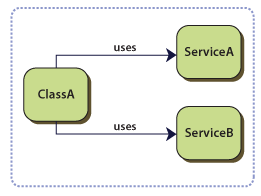
You have classes with dependencies on services whose concrete types are specified at compile time. In the following example, ClassA has compile time dependencies on ServiceA and ServiceB. The following diagram illustrates this.

This situation has the following drawbacks:

To replace or update the dependencies, you must change your classes' source code and recompile the solution.
  • The concrete implementation of the dependencies must be available at compile time.
  • Your classes are difficult to test in isolation because they have a direct reference to their dependencies. This means that these dependencies cannot be replaced with stubs or mock objects.
  • Your classes contain repetitive code for creating, locating, and managing their dependencies.
  • The next section describes how to address these issues.

Use the Service Locator pattern to achieve any of the following objectives:

You want to decouple your classes from their dependencies so that these dependencies can be replaced or updated with little or no change to the classes.
You want to write logic that depends on classes whose concrete implementation is not known at compile time.
  • You want to be able to test your classes in isolation, without the dependencies.
  • You do not want the logic that locates and manages the dependencies to be in your classes.
  • You want to divide your application into loosely coupled modules that can be independently developed, tested, versioned, and deployed.
How classes use a service locator
  

http://msdn.microsoft.com/en-us/library/ff648968.aspx

The Trusted Façade Pattern
 You want to authenticate external users that access a client application. Both the users and the application are outside the corporate firewall. The application is in the perimeter network (also known as DMZ, demilitarized zone, and screened subnet). It uses a Web service that is behind the firewall, in the corporate network. The application and the Web service also use different credential stores and authentication mechanisms. The following diagram shows the network topology.

Topology of the network
 

Use the Trusted Façade pattern with a SharePoint application to do the following:

  • Authenticate external users of a SharePoint application that is located in a perimeter network. The SharePoint application uses a credential store that is also in the perimeter network.
  • Authenticate the SharePoint application in a perimeter network to a Web service in the corporate network with credentials that are recognized in the corporate security domain.
  • Ensure the confidentiality and integrity of messages that are exchanged between the SharePoint application and the Web service.
  • Have a Web service in a corporate domain apply authorization rules that are based on the identity of the external user.
  • Avoid creating additional credential stores to store passwords in the SharePoint application.
          Trusted façade security layers


Reference 


-----------------------------------------------------------------------------------------------------------
Reference


Visual Studio2012: New SharePoint Development 2013

Thursday, September 13, 2012


  • Create lists and content types by using designers.
    You can more easily create a list or a content type by using a designer to set up and lay out the contents of the list or content type. For more information, see Creating Site Columns, Content Types, and Lists for SharePoint.
  • Create site columns for SharePoint sites.
    You can more easily create SharePoint site columns, which are also known as "fields," by using an item template. For more information, see Creating Site Columns, Content Types, and Lists for SharePoint.
  • Add Silverlight web parts to your SharePoint projects.
    You can more easily and conveniently create Silverlight web parts by using a project template. For more information, see Walkthrough: Creating a Silverlight Web Part that Displays OData for SharePoint.
  • Publish SharePoint solutions to remote SharePoint sites.
    You can publish SharePoint solutions to remote SharePoint sites, in addition to local SharePoint sites. For more information, see Deploying, Publishing, and Upgrading SharePoint Solution Packages.
  • Increase SharePoint performance by using profiling tools.
    By using tools in Visual Studio, you can identify code and other elements that are slowing down your SharePoint projects and perform other performance profiling. For more information, see Profiling the Performance of SharePoint Applications and Analyzing Application Performance by Using Profiling Tools.
  • Create sandboxed visual web parts..
    You can include visual web parts in sandboxed SharePoint projects, not just farm projects.
  • Create sandboxed solutions more easily.
    When you’re working on a sandboxed solution in Visual Studio, only compatible APIs appear in Intellisense, and a compiler error occurs if you try to use farm-only API calls.
  • Debug JavaScript more easily.
    You can debug JavaScript in SharePoint projects, and IntelliSense is provided when you're coding JavaScript in SharePoint projects. URLs for JavaScript are resolved for visual web parts in sandboxed solutions.
  • Develop SharePoint projects more easily by using streamlined project templates.
    To help streamline SharePoint development, some SharePoint project templates from the previous version of Visual Studio were moved into project item templates. For a full list and descriptions of the project and project-item templates, see SharePoint Project and Project Item Templates.
  • Test your code by using the Microsoft Fakes framework.
    SharePoint projects support Microsoft Fakes, which is an isolation framework in which you can create delegate-based test stubs and shims in .NET Framework applications and test your code by isolating your unit tests from the environment. For more information, see Verifying and Debugging SharePoint Code by Using ALM Features.