TypeScript For SharePoint 2013

Saturday, April 20, 2013


SharePoint App and JavaScript CSOM.

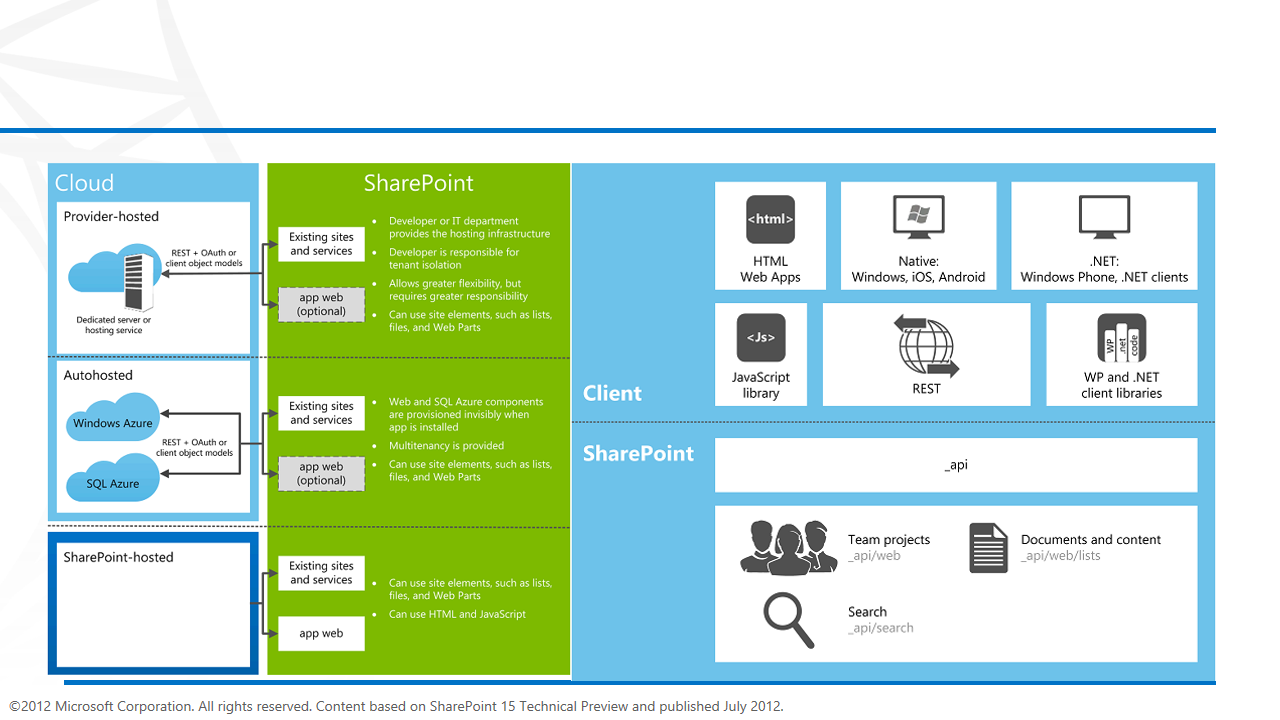
Major change in Microsoft SharePoint 2013 development Module  is SharePoint Apps . Previously We have 2 types of solution in SharePoint 2010 1  Farm Solution and  Sandbox Solution. Farm Solution  used full server side SharePoint API and Run SharePoint worker Process. And Sandbox have few limitations  and partially trusted solution which run under the site collection. The biggest change in SharePoint 2013 is App  Solution. Where everything is running outside the SharePoint . App Module is all about HTML 5 , Javascript, Jquery , CSS , Json, JavaScript CSOM. Mainly.  Microsoft greatly enhanced and improved JavaScript CSOM. To meet the Enterprise Development Requirement. SharePoint 2013 Developers need more JavaScript skills to build  large scalable Apps based on JavaScript CSOM. Which required better and highly-productive development tools .Which helps to build robust Apps. So Answer is Typescript,light switch Visual Studio 2012.

                                      
Typescript
The typescript is designed by Microsoft language for Large JavaScript based Application and Module Development .The typescript is a typed superset of JavaScript that compiles to plain JavaScript. And Provide great OOP advantages. You can create
Optional types, classes, and modules to develop large JavaScript programs. Its free and Open Source language which designed by Anders Hejlsberg lead architect of C#. You can extend JavaScript syntax without any changes. Typescript plugin is
Available for Visual Studio 2012 where you can get maximum advantage of working on strong typing and intelligence.  Which make your JavaScript Development Very easy.

Download:  Play : Learn http://www.typescriptlang.org


SharePoint Typescript Definitions
  Type definitions is required for information about Types of variables, parameters, methods, Classes, Modules. Which is by default not available for SharePoint. Might be at some later stage Microsoft Will Provide that OOB. But now thank to the Passionate Typescript Community. MVP Andrey Markeev and  Stas Vyshchepan. Create Open Source  Type Script Definitions  for SharePoint Project on Codeplex . Advantages of SharePoint Type Script Definitions is when you are working on SharePoint 2013 App Module or JavaScript CSOM. By using Typescript with Typescript Definitions for SharePoint you get leverage of OOP, and benefit from strong typing and intelligence.
http://sptypescript.codeplex.com/


  1. Client Side Object Model (CSOM) core classes
    • SP namespace (ready)
    • SP.WebParts (ready)
    • SP.Utilities (work in progress) - DateUtility and HttpUtility classes aren't ready yet
    • SP.SOD (ready)
  2. Social object library
    • SP.Sharing (ready)
    • SP.UserProfiles (ready)
    • SP.Social (ready)
  3. SharePoint Client Side Rendering 
    • SPClientTemplates (ready)
  4. Workflows
    • SP.Workflow (ready)
    • SP.WorkflowServices (ready)
  5. SharePoint UI elements:
    • SP.UI.Notify (ready)
    • SP.UI.Status (ready)
    • SP.UI.Menu (ready)
    • SP.UI.ModalDialog (ready)
    • SP.UI.ApplicationPages - some useful stuff here nobody knows about e.g. ClientPeoplePickerWebServiceInterface! (ready)
    • CalloutManager (ready)
    • SP.UI.TileView (planned)
    • SP.UI.Controls (planned)
    • SP.UI.ComboBox (planned)
  6. SharePoint Search
    • Microsoft.SharePoint.Client.Search (ready)
  7. Business Connectivity Services
    • SP.BusinessData (ready)
  8. SharePoint Managed Metadata
    • SP.Taxonomy (ready)
  9. SharePoint Publishing Infrastructure
    • SP.Publishing (planned)

SHAREPOITN 2010 Event Receivers Tip

Monday, April 8, 2013

don't  instantiate  SPWeb,SPSite,SPlist or SPListItem Objects with in event reciver. instantiating these Objects in side the event Receiver can cost you  more roundtrips to the database.


don't code like that


  using (SPSite osite = new SPSite(properties.WebUrl))
    {
    using (SPWeb sweb = osite.OpenWeb())
        {
        SPList list = sweb.Lists[properties.ListId];
        SPListItem item = list.GetItemByUniqueId(properties.ListItemId);
     
        }
    }


Code like that

   // Retrieve SPWeb and SPListItem from SPItemEventProperties instead of

// from a new instance of SPSite.
SPWeb web = properties.OpenWeb();
// Operate on the SPWeb object.
SPListItem item = properties.ListItem;
// Operate on an item.

Elevation of Privilege Best Practice

  • Remember that All Elevated Objects Must Remain Inside a RunWithElevatedPrivileges Block.
  •  All Elevated object which created in side the RunWithElevatedPrivileges not  returned to outside of the RunWithElevatedPrivileges block. 
  • If the SPListItem object is passed outside of the RunWithElevatedPrivileges block, it retains its underlying SPRequest object and continues to be elevated. Code that expects to be running under the current user's credentials will have privilege elevation problems if it uses this SPListItem object.


example 

Do not Use RunWithElevatedPrivileges like that


SPSecurity.RunWithElevatedPrivileges(delegate() {

   SPSite osite = SPContext.Current.Site;   

   SPWeb oweb = SPContext.Current.Web;  

// here you need to use oweb object as system user.
      //oweb.CurrentUser.LoginName
 

        });//Close "SPSecurity.RunWithElevatedPrivileges" block


always use using block with SPSite ,SPWeb   like that


Guid GwebID = SPContext.Current.Web.ID;
Guid GsiteID = SPContext.Current.Site.ID;

SPSecurity.RunWithElevatedPrivileges(delegate()
{
    using (SPSite site = new SPSite(GsiteID))
    {
try
{
        site.AllowUnsafeUpdates = true;
        using (SPWeb web = site.OpenWeb(GwebID))
        {
            web.AllowUnsafeUpdates = true;
          // Perform administrative actions
        }

}
catch
{
   // Handle or re-throw an exception.
}
finally
{
   site.AllowUnsafeUpdates = false;
}
         
    }
});


Reference :
http://msdn.microsoft.com/en-us/library/gg552614.aspx#bestpractice_elevpriv


Another MCPD

Thursday, March 21, 2013


Techies UAE : SharePoint 2013 NoCode Development

Friday, March 15, 2013


http://lanyrd.com/2013/sharepoint-nocode-development-by-usama/


Thanks to
Rolf Eleveld to arranging this for SharePoint Community.

SharePoint 2013 Form based authentication (FBA)

Sunday, March 10, 2013


SharePoint is the one of the best solution for sharing and managing information inside the organization. To Manage different types of User and Policies and Access rights SharePoint provides three different ways to manage User authentication. Which validate user Identity against an authentication provider. Normally we manage user with Active Directory or Database to control and manage rights and Permissions. Mostly for Public facing site and LOB which works with external users or users which are not the part of (AD DS) we use FBA to manage SharePoint Authentication.
In SharePoint 2013 we have two types of Authentication
 Claims-based Authentication.
·         Claims-based identities, a user obtains a digitally signed security token from a commonly trusted identity provider.

Important!                
·         Office Web Apps can be used only by SharePoint 2013 web applications that use claims-based authentication.

 Classic mode authentication.
  Classic mode authentication uses Windows authentication and SharePoint 2013 treats the user accounts as AD DS accounts.

There are three types of authentication method are available in SharePoint2013.

Windows authentication
   The Windows authentication type use existing Windows authentication provider (AD DS).which can use for both types of Authentication Classic and Claims-based.
   
Forms-based authentication
 
 FBA is a claims-based identity management system that is based on ASP.NET membership and role provider authentication. Forms-based authentication can be used against credentials that are stored in an authentication provider AD Ds, LDAP, SQL Server database. FBA sent User Passwords as Plaintext for web traffic should use SSL to encrypt the information’s.  

SAML token-based authentication
SAML token-based authentication in SharePoint 2013 uses the SAML 1.1 protocol and the WS-Federation Passive Requestor Profile (WS-F PRP). 
Configure Forms-based authentication in SharePoint 2013.
Create SQL Server database to Store User Information. Create Users and Roles.
Modified and configure the Central Administration Web.Config file.
Modified and configure the Security Token Service Web.Config file.
Create new Web Application with form base Auth.
Modified and configure the new web application Web.Config file.

Don’t forget to take backup of all Web.Config Files before Modifying.
To configure FBA for SharePoint 2013 Site. We have to perform following steps.


1.     Create Sql Server Database by using Asp.net 2.0 utility called aspnet_regsql.exe. By using PowerShell Command.  


2.     Open Windows Power Shell and Past following Command. It will open one wizard. Complete that with all default values. And Confirm that aspnet database has been created successfully.


3.      To confirm database is create successfully in SQL Server. Open SQL SERVER management studio and open the same instance of SQL server which you selected in wizard and check database named aspnetdb has been created. 


4.     Now Open Visual Studio and add one Blank web Application to your solution.


5.     Open web.config file and create Connections with Same Database that you created in previous step under the   configuration Tag.


6.       Add membership and Role Manager Provider under the <system.web> Tag.


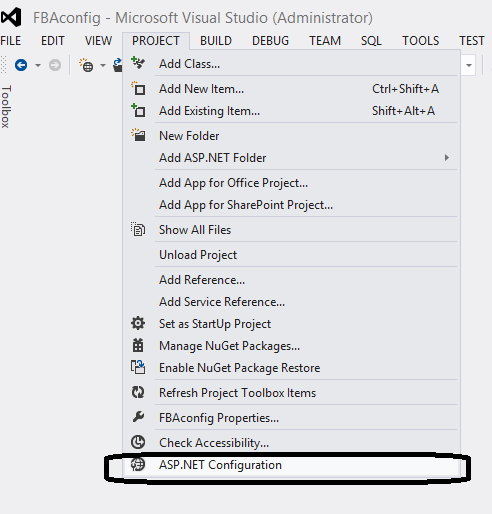
7.     Then Run Asp.net Site Configuration settings from Visual Studio 2013 and Create two user and one Role.


8.     To create users and Roles Click on Security Tab in Asp.net Site Configuration in Site create role administrator and users.


9.     Now we have to modify the Security Token Service (STS ) in IIS under the “SharePoint Web Service” web Application. In order to do that open IIS and locate the Security Token Service and right click and click on explorer and Open Web.config file in Visual Studio 2012.


10.    Find configuration and past above the tag ConnectionString from Previous Web asp.net Application. 
11.   Past RoleManager and membership under the system.web  from Previous Web asp.net Application. 


12.   Go back to IIS and Open the Central Administration and navigate Web.config file and open in Visual Studio.  

13.   File PeoplePickerWildcards and add one more key for our MembershipProvider and save.
14.   Then Search membership Override with our configuration from Previous Web asp.net Application.
15.   Then Add ConnectionString in the end of Web.config File.


16.   Create new Web Application from CA. Under Application Management set check true “Enable Forms Based Authentication (FBA)”, Allow Anonymous True, Site name : SharePointFBASite(Optional).


17.   Then Define Role and Membership Provider name and save with basic settings and Save.


18.   Create Root SiteCollection by Using following PowerShell command.


19.   Open IIS and Navigate the new root site  web.config  File and open in Visual Studio.


20.   Search PeoplePickerWildcards  Tag in Web.Config file and add another key for you membership Provider called “SharePoint2013AspNetMembershipProvider”.


21.   Open FBA Site in Brower and navigate to Site Settings > click on site Permissions Site Collection Administrators and type that user that you created in start from .net utility. In my  case this is usama and admin then click on Ok.


22.   Sign-out from site and Re-login by using farm base Auth and use FBA User name and Password in my case my username is usama.


Note
Always remember that Take backups of all config files before changing them and make sure that you have administrative and SharePoint should have access to asp.net membership database. 

Reference 
http://technet.microsoft.com/en-us/library/ee806890.aspx
http://sharepoint2013fba.codeplex.com/


SharePoint Rest Endpoint and Improvement in SharePoint 2013

Sunday, February 17, 2013


SharePoint 2013 comes again as a great development platform for Enterprise needs and Collaboration with the power of Social Features .In SharePoint 2010 Microsoft introduces Representational State Transfer (REST) service which they have improved  in SharePoint 2013 now REST Services  is fully comparable to the Client object models. Microsoft SharePoint 2013 client object models will have A corresponding REST endpoint. That developers can fully interact remotely with SharePoint data by using any technology that supports REST web requests which Use O Data Standard. The developer can perform all basic CURD (create, update, read, Delete) Operations by O Data Model. 

OData
                              
The Open Data Protocol (OData) is a web protocol for querying and updating data that provides a way to unlock your data and free it from silos that exist in applications today. OData does this by applying and building upon web technologies such as HTTP, Atom Publishing Protocol (AtomPub), and JSON to provide access to information from a variety of applications, services, and stores. (Source: Open Data Protocol site)


Access SharePoint 2013 REST ENDPOINT
In Teams to SharePoint 2013 REST ENDPOINT we use URL   http://site url/_api/web.  Previously in sharepoint2010 developers use So many clients. Svc difficult URL for rest service endpoint is still there SharePoint 2013 as well for backwards compatibility.

Easier Endpoint REST Service URLs
http://site url/_vit_bin/Client. Svc/web    (SharePoint2010)
Removing Client.SVC and make it easy To use it with the new url.
http://site url/_api/ http://site url/_api/web    (SharePoint2013)


To Use REST Service in SharePoint 2013 have made the HTTP request and serves the appropriate response in either Atom or JavaScript Object Notation (JSON) format. The client application must then parse that response. To Use SharePoint Client Object Model by Rest Service we Need entry Points where we can Access the namespace. Use the names of the APIs from the client object model separated by a forward slash (/). 

Client object model
REST equivalent
ClientContext.Web.Lists
http://server/site/_api/web/lists
ClientContext.Web.Lists[guid]
http://server/site/_api/web/lists(‘guid’)
ClientContext.Web.Lists.GetByTitle("Title")
http://server/site/_api/web/lists/getbytitle(‘Title’)


REST Services Access Points for SharePoint 2013
Area
Access point
Site
Web
User Profile
http:// server/site/_api/SP.UserProfiles.PeopleManager
Search
http:// server/site/_api/search
Publishing
http:// server/site/_api/publishing


REST Service open new door and possibility for Developer to create and manage your app for SharePoint 2013 with new web standard like OAuth and OData. SharePoint 2013 Rest Service Also Support Cross Domain cross Domain Library  to Access SharePoint 2013 data from remote apps. By using Cross domain library now app can interact with multiple domains.
How to Read Data 


How to Add and Update SharePoint Entities by Using Rest Services


You can Perform create and update operation with SharePoint entities by constructing with RESTFULL HTTP REQUEST WITH ENDPOINTS.
 

How to Delete  SharePoint Entities
 
More Reference
http://msdn.microsoft.com/en-us/library/fp142385.aspx