
Seminar Window Phone At Maju
Thursday, February 10, 2011

Agenda :
To provide abasic concept to students about windwos phone 7
application, how they can develope an application by using pohone and
how they can optimize there performance and boost there carrear in
phone development
Speaker
--
Usama Wahab Khan
Manager Software Development || Microsoft Community Speaker || Sr.Trainer Sir Syed University
Osmani and Company
Usama Wahab Khan
Manager Software Development || Microsoft Community Speaker || Sr.Trainer Sir Syed University
Osmani and Company
Venue
Muhammad Ali Jinnah University (MAJU)
Contact
Microsoft Student Partner of Muhammad Ali Jinnah University (MAJU)
Haseeb
Microsoft Student Partner of BizTek
salman shakeel
http://usamawahabkhan.blogspot.com
Contact e:
usamawahabkhan@gmail.com
ph# +923332395710
Facebook
Contact e:
usamawahabkhan@gmail.com
ph# +923332395710
Life Cycle: Page State Management
Thursday, February 3, 2011
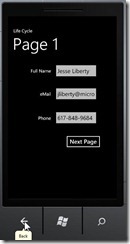
There are a few practical elements to state management, so let’s devote a few of these mini-tutorials to the exact mechanisms involvedTo start, let’s examine the scenario where the user is on a first page, fills in some data, and then navigates to a second page. For whatever reason, the user clicks the back button on the phone and is returned to the first page. At this point the user expects to see the data already filled in to be there, ready for editing. If the user hits the back button and the fields already created are now empty the application is in a state technically referred to as “sucks.” To prevent this, you will want to store the values in a State dictionary and restore those values if the user hits the back button. Fortunately, this is fairly easy to do, though you have to be a bit careful when restoring. To see this, create a new application with two pages: Mainpage.xaml and Page2.xaml. On MainPage.xaml create a few text input fields and a button, on page 2 put anything you like. You can see the MainPage.xaml I created in the illustration above. Saving and Restoring State Saving the state is pretty straightforward. As noted in the earlier article, when you are navigating away form the page the OnNavigatedFrom event is raised. Each page has an individual pre-defined State dictionary, to which you can save the state of your controls protected override void OnNavigatedFrom( System.Windows.Navigation.NavigationEventArgs e) { State["Name"] = FullName.Text; State["eMail"] = eMail.Text; State["Phone"] = Phone.Text; base.OnNavigatedFrom(e); } Restoring is just a bit trickier as you have to make sure that the value you attempt to retrieve from the dictionary actually exists. For this, I like to use the TryGetValue method, as it does not throw an exception. It takes two values and returns a boolean. The first parameter is the name of the “key” you are looking for. The second is an out parameter that will hold the value if found. The returned value is a boolean, true if the key was found, false if it was not. Remembering that the dictionary holds objects, we search for the key and if it is found we call ToString on the values obtained before writing them back to the control, Here is the complete code behind page, using System; using System.Windows; using Microsoft.Phone.Controls; namespace PageState { public partial class MainPage : PhoneApplicationPage { // Constructor public MainPage() { InitializeComponent(); GoToPage2.Click += GoToPage2_Click; } void GoToPage2_Click( object sender, RoutedEventArgs e ) { NavigationService.Navigate( new Uri( "/Page2.xaml", UriKind.Relative ) ); } protected override void OnNavigatedFrom( System.Windows.Navigation.NavigationEventArgs e ) { State["Name"] = FullName.Text; State["eMail"] = eMail.Text; State["Phone"] = Phone.Text; base.OnNavigatedFrom( e ); } protected override void OnNavigatedTo( System.Windows.Navigation.NavigationEventArgs e ) { base.OnNavigatedTo( e ); object val; if ( State.TryGetValue( "Name", out val ) ) FullName.Text = val.ToString(); if ( State.TryGetValue( "eMail", out val ) ) eMail.Text = val.ToString(); if ( State.TryGetValue( "Phone", out val ) ) Phone.Text = val.ToString(); } } }
SilverLight PDF Writer
Sunday, January 30, 2011


Create Image ,Arc,Text,Barcode to PDF
silverPDF is based on two excellent open source projects: PdfSharp (http://www.pdfsharp.net) and iTextSharp (http://itextsharp.sourceforge.net)
SiverlightPDF Library .
download http://silverpdf.codeplex.com/
Download Source
By Usama Wahab Khan
Silverlight & WPF Timeline Control
Overview
With this Silverlight and WPF control you can create interactive timelines. The control is inspired by Simile Timeline Control (which is implemented with ajax). It is completely based on templates and styles, so it is possible to provide different style for events and timeline itself. Please suggest features and vote for the project if interested. You can use it directly from HTML (for those who is not working with Silverlight) or include it into your Silverlight/WPF projects.Thanks to
Andrew Syrov
Subscribe to:
Posts (Atom)


