SharePoint Server 2013 Preview Installation for Standalone Machine (dev)

Tuesday, July 24, 2012

My First Installtion for SharePoint Server 2013 Preview for Development environment. But i have few issue like similar to sharepoint 2010 Beta. show i would like to Share and hope you can also same time. 

Per installation Check:

Hardware 


Software (not Required except SQL SERVER BUT FOR DEVELOPMENT I INSTALL VS2012)

Check Server Role

Developer will love to .net 4.5 feature in SharePoint 2013 so its Important :)

Runt SharePoint 2013 Perrequisiteinstaller.exe


Per-requisite Software has been installed and Configured

Run SharePoint 2013 Setup.exe
After the of Completion of basic installation 

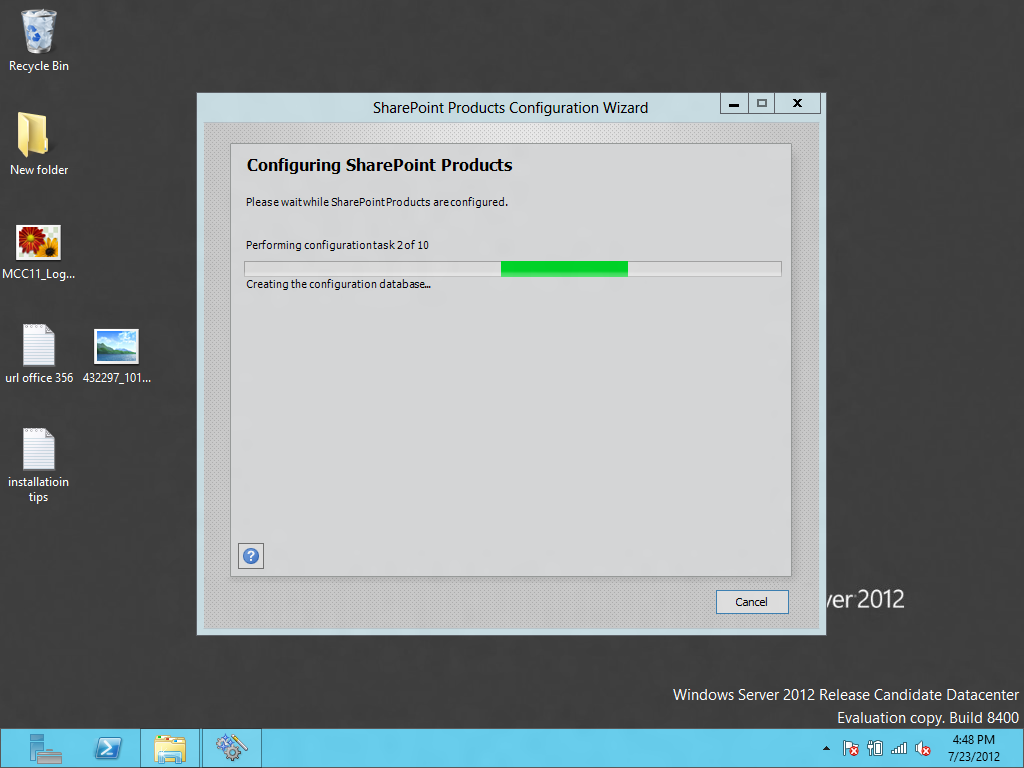
SharePoint Product Configuration started 


Chose  New Server Option


If Configuration Failed on Creation and Configuration of database and Give Error some like that.

 Failed to connect to the configuration database.
An exception of type System.Management.Automation.CmdletInvocationException was thrown.  Additional exception information: ErrorCode:SubStatus:Service running under Network Service account in workgroup environment is not supported.​ 

If you running Application without AD or Stand Alone might you will received that error.
Solution 
   Go to Sql Server Management Studio
 >loacl/SharePoint (Instance)>security>Login>Administrator>Properties>ServerRole> and Check setadmin.

then go to Startmenu>SharePoint Power Shell>Execute this Command blow to for psconfig to
AppFabric Caching Service and Sql Server Agent to on these server on server.


command:
psconfig.exe -cmd Configdb Create SkipRegisterAsDistributedCacheHost
Then Run Again the SharePoint Product Configuration.
Error No 2
Might be You got another Error 

 Failed to connect to the configuration database.
An exception of type System.Management.Automation.CmdletInvocationException was thrown.  Additional exception information: ErrorCode:SubStatus:Service running under Network Service account in workgroup environment is not supported.​ 


SEARCH Application Service Error like SharePoint 2010 Beta 

but you see new instance of SharePoint Administration is working fine.


to See the error that you face in Product config. check Centeral Administration Services >Applications> Search Service Applicaiton you can see its stoped and show error.


First Time Ruining SharePoint 2013 Root Site(Team Site)


Hope you this article will help you install SharePoint 2013 it quit bit same experience like i had in SharePoint 2010 beta. enjoy SharePoint keep SharePointing.....................

Reference Link
http://technet.microsoft.com/en-us/library/ee667264(v=office.15)
Prepare for installation
http://technet.microsoft.com/en-us/library/ff608031(v=office.15)

more Reference 
http://www.srinisistla.com/blog/Lists/Posts/Post.aspx?ID=227

By Usama Wahab Khan. 

SharePoint 2013 Office 356 First deep jump

Monday, July 23, 2012

Office 365 is really amazing with beautiful Metro UI experience and new Feature like App Part,Flow,OAuth is great.Full Cloud support and Office app,App Store.  Here few details about changes in SharePoint 2013 (Office 365)

https://davigold989.sharepoint.com/ (Team Site )

https://davigold989-public.sharepoint.com/ (Public Site)

Mysite office 365 (SharePoint 2013)


New Metro UI and almost same like 2010

team site (SharePoint 2013)

New metro live tiles and easy access for contents. share others, team site


task and calenders (SharePoint 2013)


public wiki site (SharePoint 2013)

oauth (SharePoint 2013)
SharePoint 2013 introduce new identity architecture based on oauth 


soical plug in (SharePoint 2013)

sharepoint App Store (SharePoint 2013)

after success of windows phone finally microsoft introduce apps store sharepoint 2013 publish apps and also used them in share point application with new social application management system.

new task list (SharePoint 2013)


drag and drop image uploader (SharePoint 2013)

site editing (SharePoint 2013)
improved UI and new slides effects ribbion is very nice

new metro popup (SharePoint 2013)

creating box (SharePoint 2013)

save doc in word (SharePoint 2013)


site contents(SharePoint 2013)


calender (SharePoint 2013)

People (SharePoint 2013)


site settings (SharePoint 2013)


(Central Administration) SharePoint 2013

info-Path (Central Administration) SharePoint 2013

User Profile (Central Administration) SharePoint 2013

BCS (SharePoint 2013)


term Store (Manage Search TAXONOMY ) (SharePoint 2013)


Source Store (Central Administration) SharePoint 2013 office 365
manage your credentials source service


SharePoint App form App Store (SharePoint 2013)

Software and Hardware Requirements for SharePoint 2013

Monday, July 16, 2012


Minimum Hardware Requirements

  • Processor: 64-bit, 4 cores
  • RAM:
  • 8 GB for production use

  • 4 GB for developer or evaluation use
  • Hard disk:
  • 80 GB free for system drive
  • Maintain 2x free space as available RAM
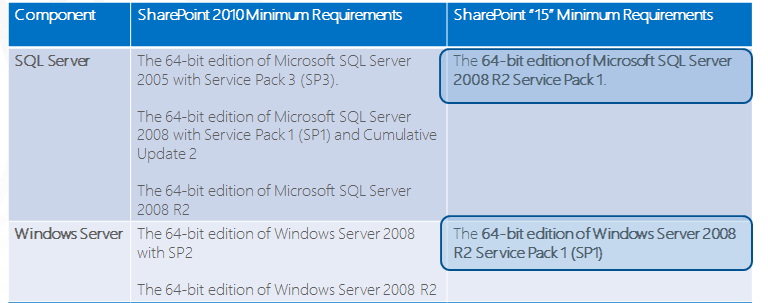
Deference between SharePoint 2010 and SharePoint 15(2013)
Database Servers

  • Processor:
  • 64-bit, 4 cores for “small” deployments
  • 64-bit, 8 cores for “medium” deployments
  • RAM:
  • 8 GB for “small” deployments
  • 16 GB for “medium” deployments
  • Hard disk:
  • 80 GB free for system drive
  • SP Data Storage dependent on corpus
  • size, performance requirements, etc.


Software Requirements
64-bit edition of Microsoft SQL Server 2008 R2 Service Pack 1

64-bit edition of Windows Server 2008 R2 Service Pack 1 (SP1) Standard, Enterprise, Data Center, or Web Server

Database Servers – Minimum Software Requirements

Database Servers – Optional Software

  • 64-bit edition of Microsoft SQL Server 2012 RTM (i.e. not Release Candidate 0 / RCO)

  • SQL Server 2012 RTM Manageability Tool Kit
  • SQL Server 2012 RTM Native Client 64-bit
  • SQL Server 2012 RTM SQL ScriptDom 64-bit
  • System CLR Types for SQL Server 2012 RTM
  • SQL Server 2012 RTM Transact-SQL 64-bit
  • SQL Server 2012 RTM Data-Tier Application Framework 64-bit
64-bit edition of Windows Server 2008 R2 Service Pack 1 (SP1) Standard, Enterprise, Data Center, or Web Server


Browser Compatibility


Introducing the app model for SharePoint 2013

SharePoint 2013 and Office 2013 Here Now Developer Preview Key Resources


This model explains how to create a test environment to use when you upgrade from SharePoint Server 2010 or SharePoint Foundation 2010 to SharePoint 2013 Products Preview.

Office 2013

Developer Training


Document
Document
This model explains the process that you use when you upgrade from SharePoint Foundation 2010 or SharePoint Server 2010 to SharePoint Foundation 2013 Preview or SharePoint Server2013 Preview.
FREE
RELEASE DATE:
7/16/2012
Document
Document
This model explains how to create a test environment to use when you upgrade fromSharePoint Server 2010 or SharePoint Foundation 2010 to SharePoint 2013 Products Preview.
FREE
RELEASE DATE:
7/16/2012
Document
Document
Use the upgrade worksheet to plan a process that upgrades to SharePoint 2013 Preview.
FREE
RELEASE DATE:
7/16/2012
Application
Application
SharePoint Designer 2013 is the tool of choice for the rapid development of SharePointapplications.
FREE
RELEASE DATE:
7/16/2012
Application
Application
SharePoint Foundation 2013 is the essential solution for organizations that need a secure, manageable, web-based collaboration platform.
FREE
RELEASE DATE:
7/16/2012
Application
Application
Language packs enable creation of sites and site collections in multiple languages without requiring separate installations of SharePoint Foundation 2013 Preview
FREE
RELEASE DATE:
7/16/2012
Application
Application
Language packs enable creation of sites and site collections in multiple languages without requiring separate installations of SharePoint Server 2013 Preview
FREE
RELEASE DATE:
7/16/2012
Application
Application
The SharePoint Server 2013 Client Components SDK can be used to enable remote and local development with SharePoint Server 2013
FREE
RELEASE DATE:
7/16/2012
Document
Document
The versatility of SharePoint 2013 Preview provides opportunities to develop a topology that satisfies your business goals.
FREE
RELEASE DATE:
7/16/2012
Document
Document
This model illustrates the databases that that support SharePoint 2013 Preview.
FREE
RELEASE DATE:
7/16/2012