


SharePoint 2013 Developer Meetup
Thanks to all MVPs, MCTs, Community Members ,for Participating in SharePoint Dev meetup.


https://sp2013devmeetup.eventbrite.com
SharePoint 2013 App authorization policy (RunWithElevatedPrivileges for App )
Friday, August 23, 2013

Allots of People ask Question’s
on MSDN SharePoint 2013 forums. how they can host app on their public site. They
want to use App Modules for Public facing site which have anonymous right or
current user does not have permissions to. something like Elevate Privileges in
developer`s term Elevate Privileges in App Module. What i think Many developer start working API
by small tutorials , sample code ,HOL and didn't understand what SharePoint
2013 New API is doing. new App Module is away with normally impersonation
confusion and make it very clear for developers there is no impersonation capability in the SharePoint
2013 API . so if Elevate Privileges ,impersonation is not
there how can get thing to be done?. SO
answer is the "App Only Policy".
The App Only Policy
In a Scenario App have to some work where current user does not
have Permission. We will use “The App Only Policy”. When user did not provide
any Kind of credential. An Oath access token is present but does not contain
user information. than we will evaluated
the permissions based App instead of
user.
Authorization in SharePoint 2013 is divided in to two types
of Entities.
1st Permission for
users.
2nd Permission for Apps.
App authorization policies types
User + app policy—When
the user + app policy is used, the authorization checks take into account both
the user identity and the app identity. In particular, when this policy is
used, authorization checks succeed only if both the current user and the app
have sufficient permissions to perform the action in question.
An example of when this policy is used is when a SharePoint
site has an embedded IFRAME that links to a Office Store app, and the app calls
back to SharePoint to access SharePoint resources on behalf of the user. That
is, when a Office Store app, which does not run in SharePoint Server, wants to
act on behalf of the user to get access to the user's resources.
App-only policy—When
the app-only policy is used, the content database authorization checks take
into account only the app identity. In particular, when this policy is used, an
authorization check succeeds only if the current app has sufficient permissions
to perform the action in question, regardless of the permissions of the current
user (if any).
Oath requires to generate App token. So App- Only Policy can
only be used for Auto Hosted Apps
or Provider Hosted Apps.
SharePoint hosted Apps cannot use App-only policy.
To request app
to use App-only policy your app
need to add attribute called “AllowAppOnlyPolicy” in tag node of AppPermissionRequests with true value. User
Must be Site Collection Administrator for allow use of the app-only
policy.

On Code

Reference and Helpful Links
http://code.msdn.microsoft.com/office/SharePoint-2013-Make-app-6e3d1ee9
By Usama Wahab Khan
CSOM SharePoint app 2013 External Services by Using WebProxy
Monday, July 29, 2013
To Create Call External Web Service in SharePoint 2013 App. we need to WebProxy class to execute web Service Request in CSOM. Let Create external Web service in SharePoint 2013 Sample App. remember SharePoint App Developer environment should configured.
You can also use Office 365 SharePoint Online.
Open Visual Studio and Create SharePoint 2013 Project.

Add your Test or developer Site URL
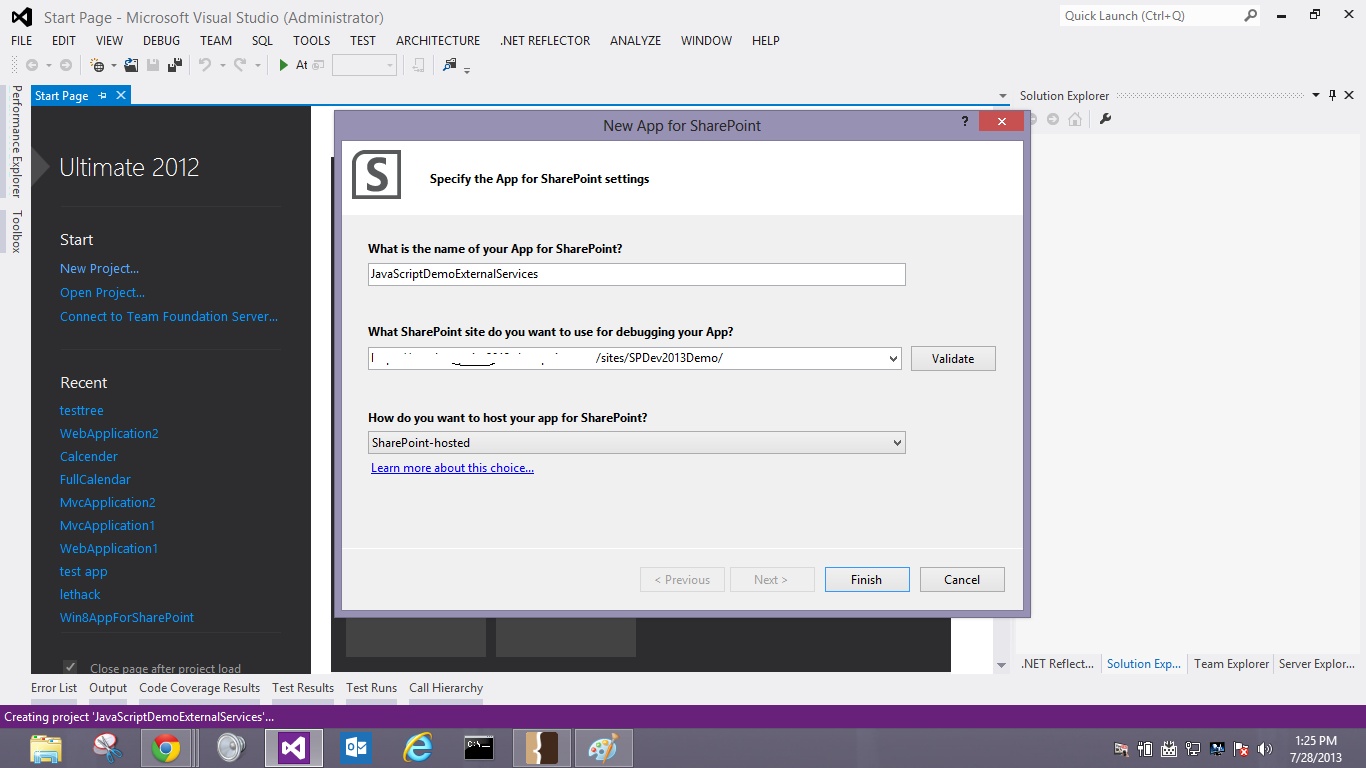
Open App.Js File from solution Explorer. Cope the Following from Sample code and Paste into App.js


To Call External URL from App you need to set Permission for that URL in you App Manifest

Add your External Web Service URL in Side tag in my case i am using free online sample of northwind Database which avaliable on services.odata.org domain name.

Open your default.aspx file in App and SP.runtime.js and Also Executed SharePOint Ready method

Define html Container with ID in my case i used message in js code so i defined tab with id


Download code Link :http://code.msdn.microsoft.com/SharePoint-Call-External-83b49a85
Related Content
- SP.WebProxy object
- Work with data in SharePoint 2013
- Apps for SharePoint overview
- Hosting options for apps for SharePoint
- Build apps for SharePoint
- How to: Create a basic SharePoint-hosted app (A Must)
By usama wahab khan
Received Microsoft Certified Trainer WelCome kit
Friday, July 26, 2013
Thanks to Microsoft Certified Trainer Team for Welcome MCT Welcome kit.


Start workflow SharePoint 2013 programmatically
Friday, July 5, 2013
Javascript :)
   // ---------- Start workflow ----------
    function StartWorkflow() {
      var errorMessage = "An error occured when starting the workflow.";
      var subscriptionId = "", itemId = "", redirectUrl = "";

      var urlParams = GetUrlParams();
      if (urlParams) {
        //itemGuid = urlParams["ItemGuid"];
        itemId = urlParams["ID"];
        redirectUrl = urlParams["Source"];
        subscriptionId = urlParams["TemplateID"];
      }

      if (subscriptionId == null || subscriptionId == "") {
        // Cannot load the workflow subscription without a subscriptionId, so workflow cannot be started.
        alert(errorMessage + "  Could not find the workflow subscription id.");
        RedirFromInitForm(redirectUrl);
      }
      else {
        // Set workflow in-arguments/initiation parameters
        var wfParams = new Object();

        // get reviewer loginname
        var html = $("#ctl00_PlaceHolderMain_docReviewerUser_upLevelDiv");
        wfParams['DocReviewerLoginName'] = $("#divEntityData", html).attr("key");
        // get editor loginname
        var html = $("#ctl00_PlaceHolderMain_docEditorUser_upLevelDiv");
        wfParams['DocEditorLoginName'] = $("#divEntityData", html).attr("key");

        // Get workflow subscription and then start the workflow
        var context = SP.ClientContext.get_current();
        var wfManager = SP.WorkflowServices.WorkflowServicesManager.newObject(context, context.get_web());
        var wfDeployService = wfManager.getWorkflowDeploymentService();
        var subscriptionService = wfManager.getWorkflowSubscriptionService();

        context.load(subscriptionService);
        context.executeQueryAsync(

            function (sender, args) { // Success
              var subscription = null;
              // Load the workflow subscription
              if (subscriptionId)
                subscription = subscriptionService.getSubscription(subscriptionId);
              if (subscription) {
                if (itemId != null && itemId != "") {
                  // Start list workflow
                  wfManager.getWorkflowInstanceService().startWorkflowOnListItem(subscription, itemId, wfParams);
                }
                else {
                  // Start site workflow
                  wfManager.getWorkflowInstanceService().startWorkflow(subscription, wfParams);
                }
                context.executeQueryAsync(
                    function (sender, args) {
                      // Success
                      RedirFromInitForm(redirectUrl);
                    },
                    function (sender, args) {
                      // Error
                      alert(errorMessage + "  " + args.get_message());
                      RedirFromInitForm(redirectUrl);
                    }
                )
              }
              else {
                // Failed to load the workflow subscription, so workflow cannot be started.
                alert(errorMessage + "  Could not load the workflow subscription.");
                RedirFromInitForm(redirectUrl);
              }
            },
            function (sender, args) { // Error
              alert(errorMessage + "  " + args.get_message());
              RedirFromInitForm(redirectUrl);
            }
        )
      }
    }

    // ---------- Redirect from page ----------
    function RedirFromInitForm(redirectUrl) {
      window.location = redirectUrl;
    }

    // ---------- Returns an associative array (object) of URL params ----------
    function GetUrlParams() {
      var urlParams = null;
      if (urlParams == null) {
        urlParams = {};
        var parts = window.location.href.replace(/[?&]+([^=&]+)=([^&]*)/gi, function (m, key, value) {
          urlParams[key] = decodeURIComponent(value);
        });
      }
      return urlParams;
    }
C#
var WSM = new WorkflowServicesManager(web); var wfSubscriptionService = WSM .GetWorkflowSubscriptionService(); //get all workflows associated with the list var subscriptions = wfSubscriptionService .EnumerateSubscriptionsByList(listId); //run all workflows associated with the list foreach (var workflowSubscription in subscriptions) { //initiation parameters var inputParameters = new DictionaryReference :(); inputParameters.Add("WFProperty", "Value"); WSM .GetWorkflowInstanceService().StartWorkflowOnListItem(workflowSubscription, itemId, inputParameters); }
http://code.msdn.microsoft.com/office/SharePoint-2013-Approval-f5ac5eb2
Subscribe to:
Posts (Atom)


